上一篇笔记提到Content Pipeline可以自定义和扩展. 扩展相对简单一些. XNA 3.0 Game Programming Recipes-A Problem-Solution Approach 3.9和3.10两节介绍了对Texture2D Processor的扩展, 可以一窥究竟.
摘录如下:
3-9. Extend the Image Content Processor
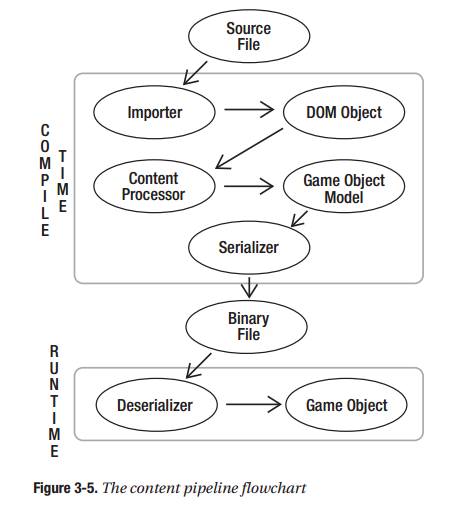
对Texture2D Processor进行扩展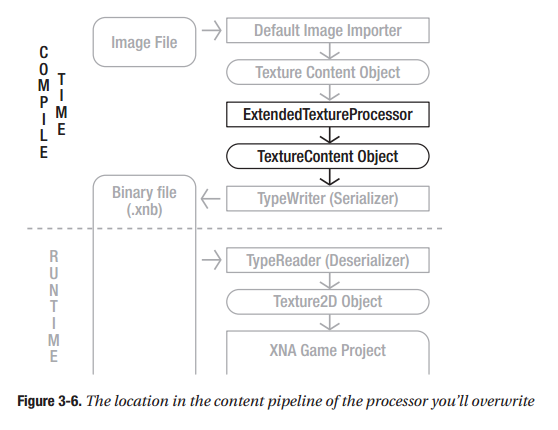
如果我们想要替换图像中的某种颜色, 可以这样做:1
2
3
4
5
6
7
8
9
10
11
12
13
14
15
16
17
18
19
20
21
22
23namespace MyImagePipeline
{
[]
public class ExtentedTextureProcessor : TextureProcessor
{
public override TextureContent Process(TextureContent input, ContentProcessorContext context)
{
TextureContent texContent = base.Process(input, context);
texContent.ConvertBitmapType(typeof(PixelBitmapContent<Color>));
for (int face = 0; face < texContent.Faces.Count; face++)
{
MipmapChain mipChain = texContent.Faces[face];
for (int mipLevel = 0; mipLevel < mipChain.Count; mipLevel++)
{
PixelBitmapContent<Color> image = (PixelBitmapContent<Color>) input.Faces[face][mipLevel];
image.ReplaceColor(Color.Black, Color.White);
}
}
return texContent;
}
}
}
Faces属性的第一个索引是图像的face. 标准2D图像只有一个face,而立方纹理有六个face。第二个索引是mipmap level,不使用mipmap的图像只有一个level。上面这段代码对纹理的每个face的每个mipmap level中的黑色变成白色
3-10. Extend the Image Content Processor: Grayscale Conversion and Processor Parameters
3-9简单地用新颜色值替换旧颜色值。对于很多图像处理技术来说,还需要获取像素的RGBA值进行计算,可能还会有外部输入参数. 下面这段代码对原图进行灰化, 并且提供了一个插值参数.1
2
3
4
5
6
7
8
9
10
11
12
13
14
15
16
17
18
19
20
21
22
23
24
25
26
27
28
29
30
31
32
33
34
35
36
37
38
39
40
41
42
43
44
45namespace GrayContentPipeline
{
[]
public class ExtentedTextureProcessor : TextureProcessor
{
private float interpolation = 0.8f;
public float Interpolation
{
get { return interpolation; }
set { interpolation = value; }
}
public override TextureContent Process(TextureContent input, ContentProcessorContext context)
{
TextureContent texContent = base.Process(input, context);
texContent.ConvertBitmapType(typeof(PixelBitmapContent<Color>));
for (int face = 0; face < input.Faces.Count; face++)
{
MipmapChain mipChain = input.Faces[face];
for (int mipLevel = 0; mipLevel < mipChain.Count; mipLevel++)
{
PixelBitmapContent<Color> oldImage = PixelBitmapContent<Color>)input.Faces[face][mipLevel];
PixelBitmapContent<Vector4> grayImage = new PixelBitmapContent<Vector4> (oldImage.Width, oldImage.Height);
for (int x = 0; x < oldImage.Width; x++)
for (int y = 0; y < oldImage.Height; y++)
{
Color oldColor = oldImage.GetPixel(x, y);
float grayValue = oldColor.R * 0.299f / 255.0f;
grayValue += oldColor.G * 0.596f / 255.0f;
grayValue += oldColor.B * 0.211f / 255.0f;
float alpha = oldColor.A / 255.0f;
Vector4 grayColor = new Vector4(grayValue,grayValue, grayValue, alpha);
Vector4 origColor = oldColor.ToVector4();
Vector4 newColor = Vector4.Lerp(origColor, grayColor, interpolation);
grayImage.SetPixel(x, y, newColor);
}
input.Faces[face][mipLevel] = grayImage;
}
}
return texContent;
}
}
}
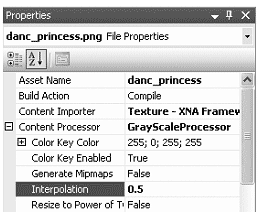
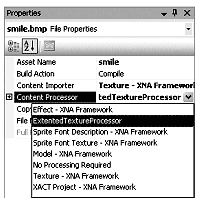
Interpolation作为公共属性, 会显示在属性面板上